Speaker Booster
Publisher Description

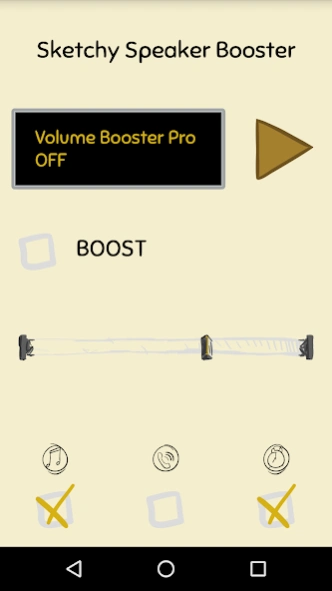


New generation speaker booster! It will increase your speakers volume up to 20%!
Try this new style
speaker
booster
. It will increase your speakers
volume
up to 10-20%.
What sets
Speaker Booster
from other similar applications is that when a user activates boost this app not only amplifies the sound to the end, but also uses the built-in Android
equalizer
to optimize the frequency channels by means of a special algorithm. So the result is a stronger and clearer
sound
.
* Enable or disable
Speaker Boost
from active notification (android 4.1+)
* Control
Sketchy Speaker Booster
from your android ware device.
* Start your favorite music player directly from
Sketchy Speaker Booster
.
You can choose three types of
volume
to be
boosted
:
* Media player
volume
,
* Ringer
volume
,
* Alarm
volume
,
* Any combination of all three
It will improve the
volume
and
sound
of your speakers and headphones and make them
sound
like a
HiFi
system.
Advertising Policy:
We inform you that this app is free of charge, but in order to be able to continue our development, we use revenue-generating ads. When you click on ads displayed by Speaker Booster, you will be redirected to a third-party web page. We may provide certain information to third parties hosting these pages, such as an email address, a phone number, and a list of other applications on your device.
If you like our app, please reward us with a 5 star rating and click the +1 button, thus supporting the future development of this app.
DISCLAIMER: This app in no way can damage your phone!
About Speaker Booster
The company that develops Speaker Booster is 100.5 Paperworks. The latest version released by its developer is 1.0 .
To install Speaker Booster on your Android device, just click the green Continue To App button above to start the installation process. The app is listed on our website since 2017-05-04 and was downloaded 14 times. We have already checked if the download link is safe, however for your own protection we recommend that you scan the downloaded app with your antivirus. Your antivirus may detect the Speaker Booster as malware as malware if the download link to hf.paperworks.sketchyspeakerbooster is broken.
How to install Speaker Booster on your Android device:
- Click on the Continue To App button on our website. This will redirect you to Google Play.
- Once the Speaker Booster is shown in the Google Play listing of your Android device, you can start its download and installation. Tap on the Install button located below the search bar and to the right of the app icon.
- A pop-up window with the permissions required by Speaker Booster will be shown. Click on Accept to continue the process.
- Speaker Booster will be downloaded onto your device, displaying a progress. Once the download completes, the installation will start and you'll get a notification after the installation is finished.
